karohemd: by LJ user gothindulgence (Camera tech)
[personal profile] karohemd

Stupid card reader won't work on my PC nor my laptop, either. :o(

Have transferred the photos via USB cable direct from the camera now and you know what? The CameraRAW plugin can't handle the NEF files. *headdesk*

At least I had the sense to shoot in RAW+JPEG when I tested it earlier so I have a few things to show. These photos are just resized without any processing and were taken with the Sigma 18-50mm f2.8 at automatic white balance, ISO100.
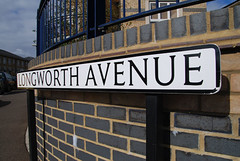


Longworth Avenue

1:1 crop of the previous pic
This is a 1:1 crop of the above

Postbox on Logan's Way

St. Andrew's cemetery

Grave flower

1:1 crop again
Again, a  1:1 crop from the above.

The abandoned house in Union Lane


At one point, I'm going to take the same shots with the D70 and the D80 (same lens, same settings) to compare.

Question to the photogeeks: Can you recommend a good RAW/NEF editor that runs under Windows XP? Thanks muchly.

Overall, I'm very happy. The card reader thing and the NEF files not being supported yet (I would have thought they'd be the same as in the D200) are hopefully a temporary hurdle.

And I really really like the Sigma. :o)

Date: 4/10/06 10:42 pm (UTC)
From: [identity profile] fractalgeek.livejournal.com
A good RAW convertor?

Try http://www.microsoft.com/windowsxp/using/digitalphotography/prophoto/raw.mspx as a way of improving your default handling: Windows then just handles them like any other supported image format. "Most Canon and Nikon".

Date: 4/10/06 10:51 pm (UTC)
From: [identity profile] karohemd.livejournal.com
That will only let me view the files but I want to edit them, too (exposure, brightness/contrast, white balance, colour etc.) The possibilities after conversion are limited, sadly.

Date: 4/10/06 11:19 pm (UTC)
From: [identity profile] bibliogirl.livejournal.com
I was recommended Pixmantec's Rawshooter, but haven't used it much in anger yet. It's running happily on my desktop on W2k and I think it installed OK on my laptop running XP also.

Date: 5/10/06 12:00 am (UTC)
From: [identity profile] karohemd.livejournal.com
Thanks, I shall try that but don't have much hope. Website says it's been bought by Adobe and integrated into Lightroom which most likely means they haven't updated since then.
I'll try the new Lightroom Beta on my laptop tomorrow.

Date: 5/10/06 07:30 am (UTC)
From: [identity profile] bibliogirl.livejournal.com
Correct, but as of when I was told about it (~4 months ago?) there was still a downloadable version available (it's possible I may still have the install file somewhere)

Date: 5/10/06 08:12 am (UTC)
From: [identity profile] karohemd.livejournal.com
It's still available (will install tonight) but it's unlikely they'll have included support for a brand new camera.

Date: 5/10/06 08:26 am (UTC)
From: [identity profile] bibliogirl.livejournal.com
Ah, yes, fair point.

Date: 4/10/06 11:21 pm (UTC)
From: [identity profile] new-brunette.livejournal.com
There's no update for ACR, then?

Bummer.

Date: 4/10/06 11:57 pm (UTC)
From: [identity profile] karohemd.livejournal.com
I've upgraded to CameraRAW 3.5 which was released a few weeks ago. No luck.
I'm going to install the new Adobe Lightroom Beta tomorrow and see if that works.

Date: 5/10/06 11:09 am (UTC)
From: [identity profile] davefish.livejournal.com
Lightroom is a somewhat different beast to Photoshop. You need quite a big machine to handle it, but its workflow managment is indeed quite nice, and changing exposure, contrast, and pulling out shadow detail is slick.

Good luck, and Enjoye

Date: 5/10/06 11:34 am (UTC)
From: [identity profile] karohemd.livejournal.com
Urk, I don't have a big machine. How big are we talking about?
Sounds good, though.
Thanks!

What did you use as RAW editor before?

Date: 5/10/06 12:45 pm (UTC)
From: [identity profile] davefish.livejournal.com
Lightroom was useable, but noticibly slow on my machine which is an Athlon 2200, with 764Mb RAM. I think that when I was using the application the memory usage just for it hovered up about 400 or 500 Mb. If you have plenty of RAM you should be okay, and if not, given that you are doing photo processing you should have more :)

I have always used Canon digital photo pro. Which is of no use to you whatsoever.

Date: 5/10/06 12:57 pm (UTC)
From: [identity profile] karohemd.livejournal.com
I have plenty of RAM (2GB) so I'll have to see. I'm also going to test Rawshooter and see how it copes.

Nikon has its own app (Capture NX) but I've not heard much good about it and it's far to expensive for what it does (ca. £120 RRP).

Date: 5/10/06 12:48 am (UTC)
From: [identity profile] fractalgeek.livejournal.com
Worth having for the ease of management, but I see what you want now. I guess that should be a plug-in for your photo editor, but it's not an area I have dabbled in much...

Date: 5/10/06 08:13 am (UTC)
From: [identity profile] karohemd.livejournal.com
That's why my question was to the photo geeks.

Date: 5/10/06 09:19 pm (UTC)
From: [identity profile] spencerpine.livejournal.com
Have you actually rolled an 80 yet? Because that would be cool.

Graham

June 2025

M T W T F S S
      1
2345678
9101112131415
16171819202122
23242526272829
30      

Tags

Style Credit

Expand Cut Tags

No cut tags
Page generated 31 May 2026 03:31 am
Powered by Dreamwidth Studios